AI Floor Plan to 3D Conversion
What is Drafto AI floor plan to 3D? Drafto instantly converts 2D floor plans into AI-powered 3D models and WebGL renders—extracting room layout, proportions, and spatial flow in seconds for marketing, listings, and client presentations.
Understand how AI converts 2D floor plans into 3D visualizations. Learn what AI can accurately extract, what it cannot infer, and what outputs you actually receive.
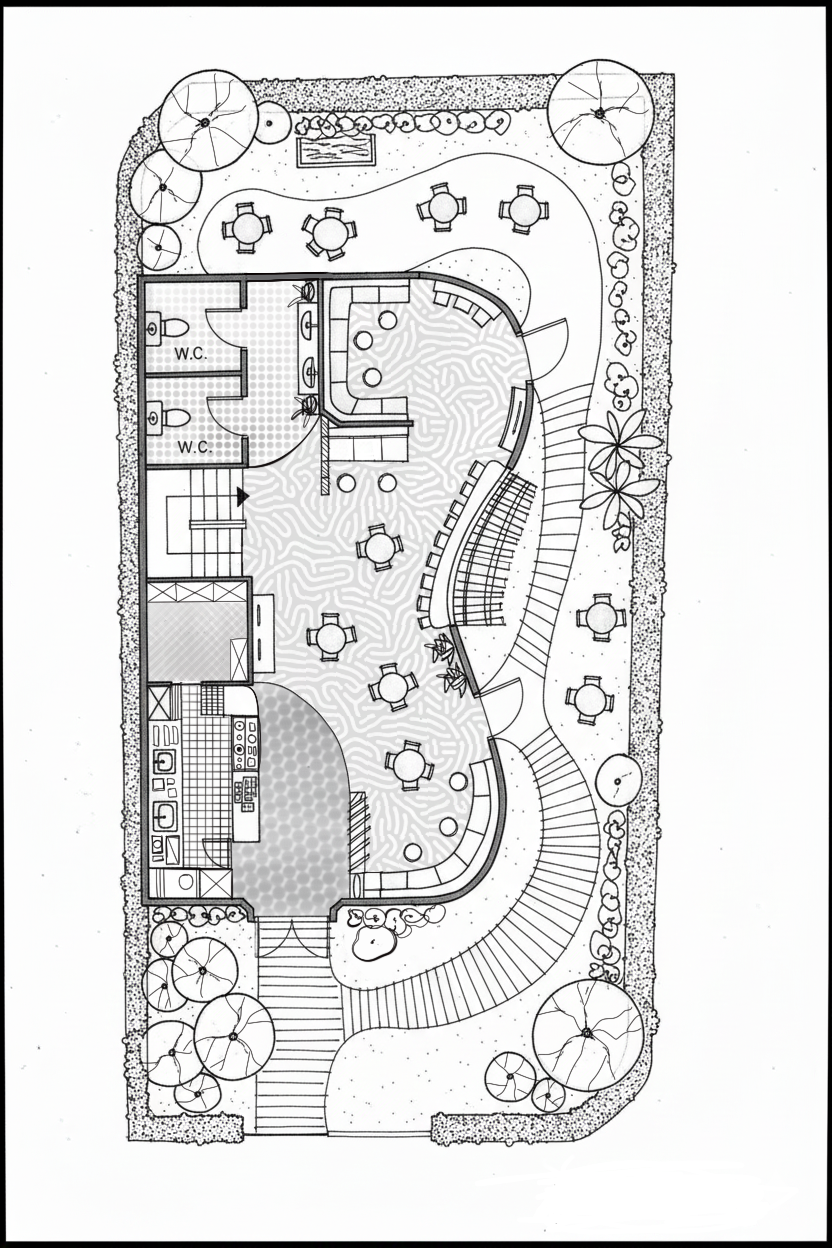
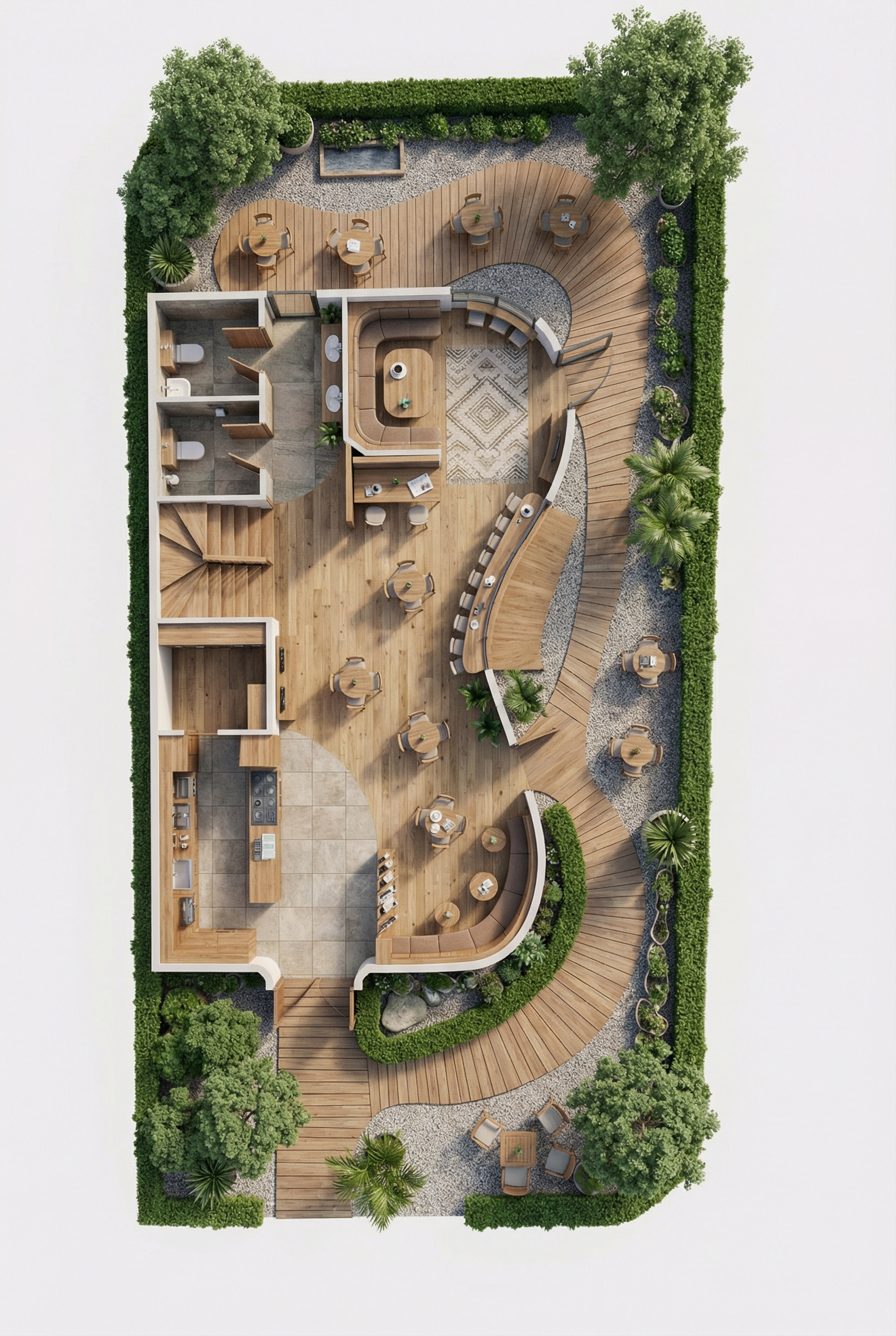
Live Drafto Example
From Flat Plan to Interactive 3D Model
Real floor plan input and AI-generated 3D output from Drafto showcase project.
The Problem of Interpreting 2D Plans
Floor plans are two-dimensional representations of three-dimensional spaces. They show room layouts, dimensions, and spatial relationships, but they omit critical information: height, materials, finishes, furniture, lighting, and environmental context. Converting a floor plan to 3D requires interpreting what's shown and inferring what's not.
This interpretation challenge affects spatial understanding, scale, and proportions. A floor plan shows where walls connect, but not how tall they are. It shows room boundaries, but not ceiling heights. It indicates door and window positions, but not their sizes or styles. These limitations mean any 2D-to-3D conversion involves assumptions and inferences.
AI floor plan to 3D conversion addresses this by using trained algorithms to recognize patterns, infer standard practices, and apply reasonable defaults. However, the accuracy and usefulness of the conversion depend on understanding what AI can reliably extract versus what it must guess.
What Information AI Extracts from a Floor Plan
Spatial Relationships
AI identifies how rooms connect, where corridors lead, and the overall flow of the space. It understands adjacency relationships—which rooms share walls, which are separated, and how movement through the space would work.
Room Boundaries and Dimensions
AI extracts room boundaries from wall lines, calculates approximate room dimensions based on scale indicators or relative proportions, and identifies room shapes. If dimensions are labeled, AI uses them directly. If not, it infers proportions from the drawing.
Architectural Elements
AI recognizes door and window symbols, identifies their positions, and understands their approximate sizes based on standard conventions. It also recognizes common architectural features like columns, stairs, and built-in elements when clearly marked.
Room Type Recognition
AI identifies room types based on size, position, and layout patterns. Large central spaces are typically living rooms, smaller enclosed spaces are bedrooms, and spaces with specific fixtures are kitchens or bathrooms. This recognition informs furniture placement and design choices.
What AI Can Accurately Infer
Wall Locations and Connections
AI accurately determines where walls are located and how they connect. Wall lines in floor plans directly translate to 3D wall positions. The AI maintains these relationships precisely, ensuring the 3D model reflects the floor plan's structural layout.
Room Boundaries and Relationships
Room boundaries are clearly defined in floor plans, and AI accurately translates these into 3D space divisions. The relationships between rooms—which share walls, which are adjacent, which are separated—are maintained with high accuracy.
Approximate Room Dimensions and Proportions
If dimensions are labeled, AI uses them directly. If not, AI infers proportions from the drawing scale and maintains relative room sizes. A room that appears twice as large as another in the floor plan will be proportionally larger in the 3D model.
Door and Window Positions
Door and window symbols in floor plans indicate positions accurately. AI places these elements in the 3D model at the correct locations. However, exact sizes and styles are inferred based on standard conventions, not specified in the plan.
Room Types Based on Size and Layout
AI recognizes room types by analyzing size, position, and layout patterns. Large central spaces are typically living rooms, smaller enclosed spaces are bedrooms, and spaces with specific fixtures are kitchens or bathrooms. This recognition is based on common architectural patterns.
Spatial Flow Between Rooms
The flow of movement through spaces is evident in floor plans through door placements and room connections. AI accurately represents this flow in 3D, showing how people would move through the space and which areas are accessible from others.
What AI Cannot Guess
Specific Materials
Floor plans do not specify materials like hardwood, tile, carpet, or specific wall finishes. AI applies reasonable defaults based on room types—kitchens might get tile, bedrooms might get carpet—but these are inferences, not specifications from the plan.
Exact Furniture Brands or Models
AI places furniture appropriate to room types, but it cannot determine specific brands, models, or exact pieces. A living room gets a sofa, but not a specific brand or style. Furniture selection is based on room type and standard practices, not design specifications.
Ceiling Heights
Floor plans show horizontal dimensions but not vertical ones. AI applies standard ceiling heights—typically 8 to 10 feet—but cannot determine exact heights unless specified. Vaulted ceilings, dropped ceilings, or non-standard heights are not detectable from floor plans alone.
Exact Window Sizes or Styles
Window positions are clear in floor plans, but exact sizes and styles are not. AI infers reasonable window sizes based on room proportions and standard practices, but cannot determine specific dimensions or window types without additional information.
Specific Lighting Fixtures
Floor plans may show light fixture symbols, but not specific fixtures or lighting designs. AI applies general lighting appropriate to room types, but cannot determine exact fixtures, chandeliers, or lighting schemes without additional specifications.
Color Schemes or Decorative Elements
Color, decorative elements, artwork, and styling choices are not present in floor plans. AI applies neutral, professional color schemes and standard design elements, but cannot determine specific color palettes or decorative preferences without additional input.
Accuracy Expectations
AI floor plan to 3D conversion achieves high accuracy for spatial layout and room relationships. Wall positions, room boundaries, and spatial connections are maintained precisely because these elements are directly visible in the floor plan. The 3D model accurately represents the 2D plan's structural layout.
Proportional accuracy is maintained when dimensions are labeled or when the floor plan uses a consistent scale. Room sizes relative to each other are preserved, ensuring the 3D model reflects the floor plan's proportions. However, absolute dimensions depend on the accuracy of the original plan and any scale information provided.
Room type recognition is generally accurate for standard layouts. Living rooms, bedrooms, kitchens, and bathrooms are identified correctly based on size, position, and layout patterns. However, unusual or non-standard room configurations may be misidentified, requiring manual correction or clarification.
Furniture and design element placement follows standard practices and room type conventions. The AI places appropriate furniture for each room type, but specific pieces, styles, or arrangements are inferred, not specified. This means the 3D model shows a reasonable interpretation of the space, not an exact design specification.
Materials and finishes are applied based on room type conventions, not specific design choices. The AI uses standard material selections—tile for kitchens and bathrooms, carpet for bedrooms, hardwood for living areas—but these are defaults, not specifications. Actual material choices require additional design input.
Important Limitation
AI floor plan to 3D conversion produces visualization outputs, not construction documents. The 3D models are accurate for spatial understanding and marketing purposes, but they do not include construction specifications, structural details, or technical drawings required for building. For construction, you need professional architectural drawings and CAD files.
What You Actually Receive
3D Spatial Visuals
You receive 3D visualizations that show spaces in three dimensions. These are rendered images and interactive views that help visualize how the floor plan translates to actual space. They are visual outputs, not CAD files or editable 3D models.
These visuals are designed for understanding spatial relationships, not for technical construction use.
Marketing-Grade Visual Outputs
The outputs are high-resolution rendered images suitable for marketing materials, presentations, and client communications. They show furnished, lit, and textured spaces that help visualize the floor plan's potential.
These outputs are optimized for visual communication, not technical documentation.
Not Architectural Construction Drawings
The outputs are not architectural construction drawings, CAD files, or technical specifications. They do not include structural details, construction dimensions, material specifications, or building codes. They are visualization tools, not construction documents.
For construction, you need professional architectural drawings created by licensed architects or engineers.
These 3D visualizations can be used to generate marketing materials. Learn more about converting these outputs into real estate marketing materials including brochures, banners, and website visuals.
Real-World Use Cases
Pre-Sales Visualization
Property developers use AI floor plan to 3D conversion to show potential buyers what spaces will look like before construction begins. The 3D visualizations help buyers understand spatial relationships, room sizes, and layout flow, enabling them to make purchase decisions based on visualization rather than abstract floor plans.
Concept Validation
Architects and designers use 3D conversions to validate design concepts quickly. Converting a floor plan to 3D helps identify spatial issues, test layout flow, and visualize how spaces will feel. This early-stage visualization enables faster design iteration and concept refinement before detailed design work begins.
Early-Stage Presentations
Real estate agents and property marketers use 3D conversions for client presentations and marketing materials. The visualizations help clients understand properties that don't exist yet or aren't ready for photography. They provide a visual reference that makes floor plans more accessible and understandable to non-technical audiences.
Once you have 3D visualizations, you can generate detailed interior renders. Learn more about AI interior rendering from floor plans as the next step in your visualization workflow.
Frequently Asked Questions
Convert Your Floor Plan to 3D
Understand the accuracy and limitations of AI floor plan to 3D conversion. Get transparent, analytical information about what AI can extract and what it cannot infer. Convert your floor plan and receive 3D spatial visualizations for visualization and marketing purposes.
Explore more: Drafto homepage | Interior rendering